 vibgg
Guides · 4 min read
How to sign up for OKX: referral code, ID check and futures
Open an OKX account step by step: choosing your region, where the referral code goes and why it cannot be added later, identity verification, enabling perpetual futures, and where to check your fee rebate.
OKX's sign-up takes a few minutes and asks for one thing more than most exchanges: your country or region comes first, because it decides which products the account can use. As on every exchange, the referral code is the step to get right, because it only takes effect during sign-up. This guide follows OKX's own help articles and ends with where to see the fee rebate on your account.
Disclosure: the sign-up links on vibgg are referral links. vibgg's OKX link is set to return 20% of the trading fees you pay as a rebate. The steps are the same with or without a referral link.
Before you start
- Check that OKX serves your region, for the products you want. Choose your real country of residence at sign-up: OKX uses it to decide what the account can trade, and perpetual futures are not offered everywhere spot trading is. Do not try to get around a restriction.
- You must be at least 18. OKX requires identity verification after registration, and an unverified account cannot trade, deposit or withdraw.
- Have an email address and a phone number ready. OKX verifies both during sign-up.
Step 1: sign up through the referral link
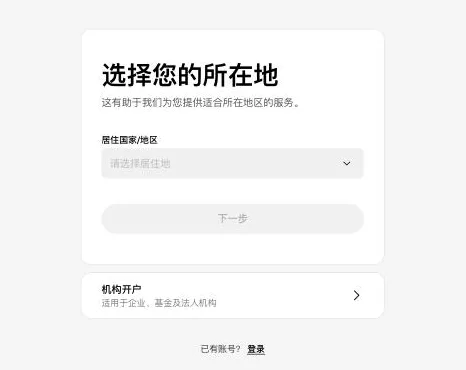
- Open the OKX sign-up page, choose your country or region, accept the terms of service, the risk and compliance disclosure and the privacy notice, and select Create account.
- Enter your email address and check the referral code. The code sits on the same screen as the email field; arriving through a referral link fills it in. Then select Sign up.
- Enter the code OKX sends to your email.
- Add your phone number with the correct country code, select Verify now and enter the code sent by text message.
If the referral code is missing
OKX says invite codes only take effect during sign-up and cannot be added once the account exists, and it warns against deleting an account and registering again to change the code. For affiliate codes, its help pages describe a separate rebind process that the affiliate has to enable, with a 30-day cooling-off period. If the referral field is empty when you sign up, stop and reopen the referral link rather than finishing without it.
Step 2: verify your identity
Start identity verification from your account page as soon as registration is done. Until it is complete OKX blocks buying and selling, deposits, withdrawals and transfers. The documents accepted depend on your country; OKX's verification pages list them.
Step 3: enable perpetual futures
OKX's most basic account mode is for spot trading only: it is called Spot mode in OKX's current interface and Margin free mode in older help articles, and it does not include perpetual futures. If the perpetuals page asks you to switch, change the account mode in your trading settings to Futures mode, or to one of the advanced modes.
- Go to Trade in the top menu and choose Perpetual.
- Move funds from your Funding account to your Trading account with Transfer under Assets.
- Choose USDT-margined contracts and pick a pair.
- Choose Isolated or Cross margin and set the leverage. Isolated limits a position's losses to the margin assigned to it; cross shares the whole balance.
Leverage changes the margin, not the funding: funding is charged on the position's full value. The guide to what leverage costs and the guide to funding and liquidation risk cover both choices.
How the fee rebate works, and how to check it
On OKX, whether an invite code carries a fee rebate, and at what rate, is set by the affiliate channel behind it. The rebate does not lower the fee charged on a trade: you pay the standard fee, and the rebate is returned trade by trade as a series of small credits, on eligible spot and perpetual trades.
Through vibgg's link, the rebate is 20% of the trading fees you pay.
- Your rebate rate: User Center → Account information → Invite perks. A rate of 0% means the code carries no rebate.
- The credits: Assets → Order center → Funding history.
These menu paths come from OKX's affiliate help pages and can differ slightly by region and by app version.
What your first futures trades cost
A regular OKX account pays 0.02% as a maker and 0.05% as a taker on USDT-margined perpetuals, before any rebate. Market orders pay the taker fee on the way in and again on the way out.
Most contracts also charge funding several times a day. The OKX fee page shows every VIP level and what a month of trading costs at each volume, and the funding fee calculator compares a position's funding on OKX with the other four exchanges.