 vibgg
Guides · 3 min read
How to sign up for Gate: invitation link, ID check and futures
Open a Gate account step by step: choosing your region, keeping the invitation, account security, the identity verification futures require, activating futures, and checking a fee rebate.
Gate's sign-up starts like OKX's, with your country or region of residence, and its futures require one thing more than registration: identity verification has to be complete before the futures account will activate. Gate's help pages do not describe adding an invitation after an account exists, so the link you sign up through is the one that counts. This guide follows Gate's own help articles.
Disclosure: the sign-up links on vibgg are referral links. vibgg's Gate link is set to return 20% of the trading fees you pay as a rebate. The steps are the same with or without a referral link.
Before you start
- Choose your real country or region. Gate decides which of its services the account can use from it, and suggests a local site where one exists, as it did for the visit below, which came from Japan. Do not try to get around a restriction.
- One email or phone number per account. Gate does not allow the same address or number on two accounts.
- Have your ID ready for identity verification, which futures trading requires.
Step 1: sign up through the invitation link
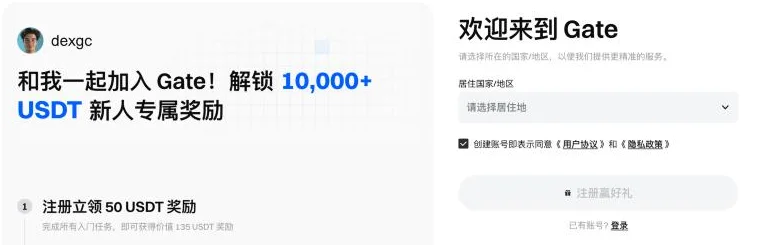
- Open the Gate sign-up page. Check that the inviter's name appears on the page: that is how you know the invitation is attached.
- Choose your country or region of residence and accept the user agreement and privacy policy.
- Choose email or phone number, enter it and select Next.
- Enter the verification code Gate sends; select Resend if it does not arrive.
- Set a login password and select Confirm to finish.
Step 2: secure the account
Before futures, Gate asks you to bind at least one security method, such as Google Authenticator, email or phone, and to set a fund password. Both are under Security Verification, reached from your avatar.
Step 3: verify your identity
Gate makes identity verification mandatory for futures trading and requires it before the futures account is activated. Choose individual verification, enter your details and upload the documents asked for. Gate says individual checks typically take from a few hours to one business day.
Step 4: activate futures
Once verification is complete, select Futures in the top navigation; Gate activates the futures account automatically. Make sure your USDT is in the account futures trade from, using Gate's transfer function if it is held elsewhere, then choose the margin mode and leverage on the order panel.
Leverage changes the margin, not the funding: funding is charged on the position's full value. The guide to what leverage costs and the guide to funding and liquidation risk cover both choices.
Checking the fee rebate
A referral rebate, where one applies, is paid after the trade and does not change the fee shown on the order. Gate's help pages do not describe where an invitee sees it, so after your first trades look for rebate credits in your account's fund history, and ask Gate support to confirm the invitation on your account if none appear.
Through vibgg's link, the rebate is 20% of the trading fees you pay.
What your first futures trades cost
A regular Gate account pays 0.02% as a maker and 0.05% as a taker on USDT perpetuals, before any rebate. Gate's VIP criteria list 30-day trading volume, GT holdings and account assets.
Funding is charged on top, at each settlement. The Gate fee page shows every VIP level and what a month of trading costs at each volume, and the funding fee calculator compares a position's funding on Gate with the other four exchanges.