 vibgg
Guides · 5 min read
How to sign up for Binance: referral code, ID check and futures
Open a Binance account step by step: where the referral code goes and why it usually cannot be added later, identity verification, opening a USDⓈ-M futures account, and how to check the fee rebate arrives.
Opening a Binance account takes a few minutes, and almost every step can be redone later. The exception is the referral code: it is linked when the account is created and, with one narrow exception, cannot be added or changed afterwards. This guide follows Binance's own sign-up and futures guides, notes where each choice affects what you pay, and ends with how to confirm a fee rebate is actually arriving.
Disclosure: the sign-up links on vibgg are referral links. vibgg's Binance link is set to return 20% of the trading fees you pay as a rebate. The steps are the same with or without a referral link.
Before you start
- Check that Binance serves your country. Binance does not operate everywhere, and futures are restricted in more places than spot trading. Read Binance's terms for your country first, and do not try to work around a restriction: an account that breaks the terms can be limited or closed.
- Have your ID ready. Binance requires identity verification before you can trade anything, so the account is of little use until it is done.
- Decide how you will sign up. Email, phone number, or a Google, Apple or Telegram login all work. Binance warns that the account type, personal or entity, cannot be changed after registration.
Step 1: sign up through the referral link
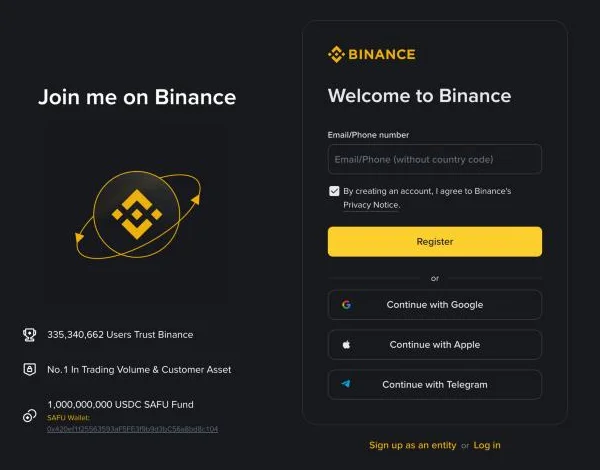
- Open the Binance sign-up page and enter your email address or phone number, then select Register.
- Enter the six-digit code Binance sends. It expires after 30 minutes.
- Choose a password of at least eight characters, with at least one uppercase letter and one number.
- Check the referral code. When you arrive through a referral link, the next screen shows the code already filled in, with a green tick and the word Linked. Leave it as it is.
- Select Next to finish.
Signing up with Google, Apple or Telegram follows the same pattern, and the referral step appears in the same place.
If the referral code did not link
Binance does not let you edit a linked code, and a code typed in later normally does not count. There is one way back: within 30 days of registering, an account that has made no deposit and no trade, and has no referral linked yet, can be bound on Binance's referral binding page, subject to a few further checks. After the first deposit or trade that chance is gone, so confirm the code before you fund the account.
Step 2: verify your identity
Binance requires identity verification before any trading, spot or futures. Start it from your account page and follow the prompts; the documents accepted depend on your country, and Binance's verification guide lists them.
Step 3: open a USDⓈ-M futures account
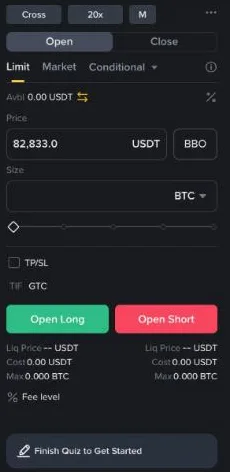
- Select Futures on the Binance home page and then Open Account.
- Choose your trading experience. It sets the default leverage: 2x for a beginner, 5x for an experienced trader and 20x for an advanced one. Choosing a lower default costs nothing and leaves less room for an expensive mistake.
- Accept the futures service agreement and risk acknowledgment, then select Open Now.
Leverage only changes the margin you put up; the funding a position pays is charged on its full value. The guide to what leverage costs works through the numbers.
Step 4: move funds to the futures wallet
Futures use their own wallet. Transfer USDT from your Spot wallet to USDⓈ-M Futures before placing an order. Then pick a margin mode: isolated limits a position's losses to the margin you assign to it, while cross lets every position draw on the whole futures balance. The guide to funding and liquidation risk explains why the choice matters for long holds.
How the fee rebate works, and how to check it
Binance pays referral rebates rather than lowering the fee you see. Under its Referral Pro programme the person who referred you earns a commission on your futures fees and can choose to pass part of it to you. Your share is converted to USDC every hour and paid into your Spot account within six hours. Each trade still shows the standard fee; the rebate arrives afterwards as small USDC credits.
Through vibgg's link, the rebate is 20% of the trading fees you pay.
To check it, place a small futures trade and look for USDC credits in your Spot account over the following hours. If nothing has arrived a day after trading, the referral most likely did not link; see the 30-day rule above.
What your first futures trades cost
A regular Binance account pays 0.02% as a maker and 0.05% as a taker on USDⓈ-M futures, before any rebate. Opening and closing a position with market orders pays the taker fee twice; resting limit orders pay the maker fee.
Fees are only part of the cost. Most contracts also charge funding every eight hours, paid by longs when the rate is positive and by shorts when it is negative. The Binance fee page shows every VIP level, and the funding fee calculator works out what a position would pay on Binance and the other four exchanges.